
Introduction
Have you ever wondered why some websites appear at the top of Google search results while others are difficult to find?
The answer often involves Search Engine Optimization (SEO).
SEO is one of the most important parts of digital marketing. It helps businesses, websites, bloggers, and personal brands improve their visibility in search engines and attract people who are actively searching for relevant information, products, or services.
If you are new to SEO, the process may seem complicated. However, understanding the fundamentals can help you create a website that is easier for both users and search engines to understand.
In this SEO for beginners guide, you will learn what SEO is, how search engines work, important SEO techniques, common SEO mistakes, and practical ways to improve your website ranking on Google.
What Is SEO?
Search Engine Optimization (SEO) is the process of improving a website and its content to help search engines understand the website and make its pages more useful and discoverable for relevant searches.
When someone searches for something on Google, the search engine analyzes many signals to determine which results are most relevant and useful for that search.
For example, if someone searches for “digital marketing tips for beginners,” Google may display websites that provide helpful and relevant information about that topic.
The goal of SEO is not simply to get a website to rank higher. It is also about creating a better experience for people who visit the website.
Why Is SEO Important?
SEO can be an important part of a long-term digital marketing strategy because search engines can send relevant visitors to your website.
Here are some major benefits of SEO:
1. Increases Organic Traffic
Organic traffic refers to visitors who reach your website through unpaid search engine results.
A website that performs well for relevant searches can attract visitors without paying for every individual click.
2. Improves Online Visibility
SEO can help your website appear when potential customers search for topics related to your business.
Greater visibility can increase opportunities for people to discover your brand.
3. Builds Credibility
Websites that consistently provide useful, accurate, and well-organized information can build trust with their audience.
4. Supports Long-Term Growth
SEO usually requires ongoing effort, but well-optimized content can continue attracting relevant visitors over time.
5. Helps Reach the Right Audience
SEO focuses on search queries, meaning you can create content around topics that your target audience is actively looking for.
How Does Google Search Work?
Before learning SEO techniques, it is useful to understand the basic search process.
Google generally discovers and processes web pages through three broad stages:
Crawling
Search engines use automated programs to discover webpages and follow links between pages.
Indexing
After discovering a page, Google processes and stores information about it in its index when appropriate.
Ranking and Serving Results
When someone performs a search, Google’s systems select and order relevant results based on many factors and signals.
Because search engines use complex systems, there is no guaranteed method to achieve a particular ranking position.
The best approach is to create useful content, make your website accessible, and follow search engine guidelines.
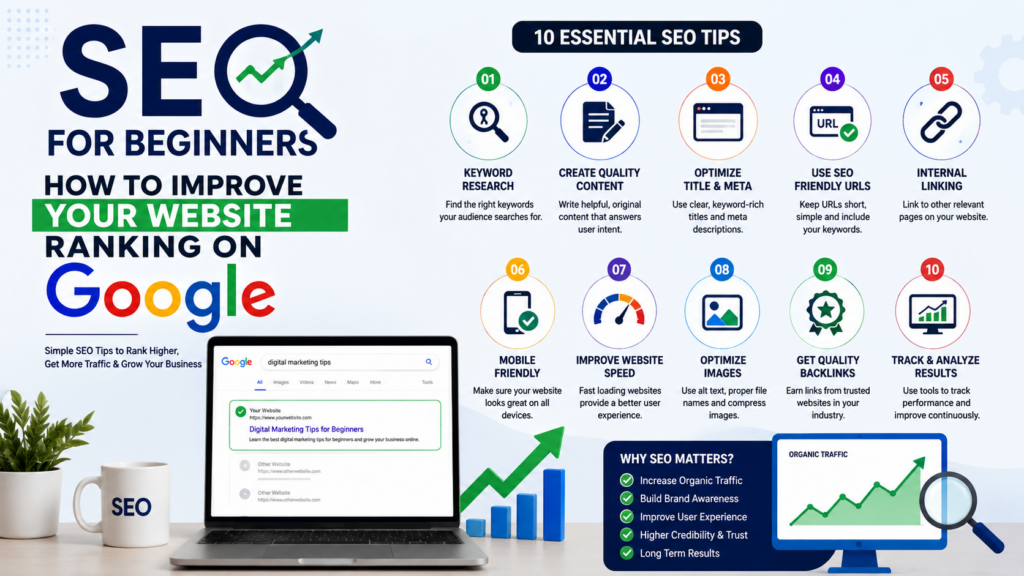
10 SEO Tips for Beginners
1. Start With Keyword Research
Keyword research is the process of identifying words and phrases people use when searching for information online.
For example, if your website is about digital marketing, relevant keywords might include:
- Digital marketing
- Digital marketing strategies
- SEO for beginners
- Social media marketing
- Content marketing
- Online marketing tips
Keyword research helps you understand what your audience is searching for and gives you ideas for creating relevant content.
However, avoid choosing keywords only because they have high search volume. Consider whether the keyword matches your audience and the purpose of your website.
2. Understand Search Intent
Search intent refers to the reason behind a user’s search.
For example:
Informational intent:
“What is SEO?”
Commercial investigation:
“Best SEO tools for beginners”
Transactional intent:
“Buy SEO software”
Navigational intent:
“Google Search Console”
Understanding search intent helps you create content that answers what the user actually wants.
If someone searches “what is SEO,” they probably want an explanation rather than a sales page.
3. Create Helpful, High-Quality Content
Content is an important part of SEO.
Your content should provide genuine value to readers and answer their questions clearly.
Good SEO content should:
- Be useful
- Be easy to understand
- Answer the search query
- Be well organized
- Use accurate information
- Provide original value
- Be written for people first
Avoid creating content simply to insert keywords. Search engines are designed to provide useful results to users.
4. Optimize Your Page Title
The page title helps users and search engines understand what a webpage is about.
For example:
Weak title:
“Home”
Better title:
“SEO for Beginners: 10 Practical Tips to Improve Your Website”
A good title should accurately describe the page and naturally include the main topic when appropriate.
5. Use Clear Headings
Organize your content with descriptive headings.
For example:
- H1: SEO for Beginners
- H2: What Is SEO?
- H2: Why Is SEO Important?
- H2: SEO Tips for Beginners
- H3: Keyword Research
- H3: On-Page SEO
Clear headings make long articles easier to read and help search engines understand the structure of your content.
6. Optimize Your URLs
Keep your URLs short, descriptive, and relevant.
For example:
Less useful:example.com/page?id=12345
Better:example.com/seo-for-beginners/
A descriptive URL can help users understand what the page is about before clicking it.
7. Improve Internal Linking
Internal links connect one page on your website to another page on the same website.
For example, if you have a blog about SEO, you could link to another article about digital marketing strategies.
Internal linking can help:
- Users discover related content
- Search engines discover pages
- Organize website content
- Establish relationships between topics
Use descriptive anchor text rather than vague phrases such as “click here.”
8. Make Your Website Mobile-Friendly
Many people access websites using smartphones and tablets.
Your website should provide a good experience across different screen sizes.
Make sure:
- Text is easy to read
- Buttons are easy to tap
- Images fit the screen
- Navigation is simple
- Pages load properly on mobile devices
A mobile-friendly website improves usability and supports a better overall experience.
9. Improve Website Speed
Website performance matters because users generally prefer websites that load quickly and respond smoothly.
You can improve website performance by:
- Compressing images
- Using modern image formats
- Reducing unnecessary plugins
- Minimizing unnecessary scripts
- Using reliable hosting
- Enabling browser caching where appropriate
Regularly test your website to identify performance problems.
10. Optimize Images
Images can improve the visual quality of your content, but they should also be optimized.
Useful image SEO practices include:
- Use descriptive file names
- Compress large images
- Use appropriate image formats
- Add meaningful alt text when appropriate
- Avoid unnecessarily large image dimensions
For example, instead of:
IMG12345.jpg
use a descriptive filename such as:
seo-tips-for-beginners.jpg
Alt text should accurately describe the image when it serves a meaningful purpose.
On-Page SEO vs Off-Page SEO
SEO can be divided into different areas.
On-Page SEO
On-page SEO focuses on elements that you can optimize directly on your website.
Examples include:
- Page titles
- Headings
- Content
- URLs
- Internal links
- Images
- Meta descriptions
- Keyword usage
Off-Page SEO
Off-page SEO refers to activities that happen outside your website that can contribute to its reputation and visibility.
One important area is earning relevant, high-quality backlinks from other websites.
Other activities may include digital PR, brand mentions, partnerships, and creating content that naturally earns references.
The focus should be on earning legitimate, relevant links rather than trying to manipulate search rankings.
Technical SEO Basics
Technical SEO focuses on aspects of a website that help search engines crawl, understand, and access its content.
Beginners should understand areas such as:
Website Structure
Create a logical website structure where important pages are easy to find.
HTTPS
Use HTTPS to provide a secure connection between users and your website.
XML Sitemap
An XML sitemap can help search engines discover important URLs on your website.
Robots.txt
A robots.txt file can provide instructions about which areas of a website automated crawlers should or should not access.
Canonical URLs
Canonicalization can help search engines understand the preferred version of pages when similar or duplicate URLs exist.
Technical SEO can become advanced, but understanding the basics gives beginners a strong foundation.
How to Improve Your Google Ranking
There is no guaranteed formula for achieving the number-one position on Google.
However, you can improve your website’s overall SEO by following these principles:
Create Content That Satisfies Search Intent
Understand what users want and provide a complete answer.
Keep Content Updated
Review important pages periodically and update outdated information when necessary.
Build Topic Authority
Instead of publishing random articles, create a collection of useful content around related topics.
For example, a digital marketing website could create content about:
- Digital marketing
- SEO
- Social media marketing
- Content marketing
- Email marketing
- PPC advertising
Then connect related articles through internal links.
Earn Quality Backlinks
Create useful resources that other websites may want to reference naturally.
Improve User Experience
Make your website easy to navigate, readable, mobile-friendly, and fast.
Common SEO Mistakes Beginners Should Avoid
Keyword Stuffing
Do not repeatedly use the same keyword just to influence rankings.
Write naturally and use relevant terms where they make sense.
Copying Content
Avoid copying content from other websites. Create original content that provides your own useful perspective and information.
Buying Low-Quality Backlinks
Large numbers of irrelevant or manipulative links can create problems. Focus on earning relevant, trustworthy references.
Ignoring Mobile Users
A website that works poorly on smartphones can create a poor user experience.
Writing Only for Search Engines
Your primary audience is people.
Create content that answers questions, solves problems, and is easy to understand.
Expecting Instant Results
SEO is usually a long-term process. Some pages may gain visibility relatively quickly, while others can take much longer.
SEO Tools for Beginners
There are many tools that can help you understand and improve your website’s SEO.
Useful categories include:
- Keyword research tools
- Search performance tools
- Website analytics tools
- Page speed testing tools
- Technical SEO crawlers
- Backlink analysis tools
For beginners, start with tools that help you understand search queries, website performance, indexing, and user behavior rather than trying to use every SEO tool available.
How Long Does SEO Take?
One of the most common questions beginners ask is how long SEO takes to work.
There is no fixed timeline.
SEO results can depend on:
- Website age
- Competition
- Industry
- Content quality
- Website authority
- Technical issues
- Search demand
- Competition for target keywords
- Consistency of optimization
Some changes can produce improvements relatively quickly, while competitive keywords may require significant time and effort.
Instead of expecting immediate results, focus on creating useful content and improving your website consistently.
A Simple SEO Checklist for Beginners
Before publishing a webpage or blog post, check the following:
- Choose a clear primary topic
- Research relevant keywords
- Understand search intent
- Create useful and original content
- Write a descriptive page title
- Use clear headings
- Create a simple URL
- Add relevant internal links
- Optimize images
- Make the page mobile-friendly
- Check page performance
- Review the content for accuracy
- Add a useful meta description
- Monitor performance after publishing
Conclusion
SEO for beginners does not have to be complicated.
Start with the fundamentals: understand what your audience is searching for, create useful content, optimize your website structure, improve page experience, and make your content easy for search engines to understand.
Remember that SEO is not about finding a secret trick to rank number one on Google. It is about consistently creating a website that provides value to users and makes it easy for search engines to discover and understand your content.
If you are building a digital marketing website, SEO should be an important part of your overall strategy. Start with a few well-researched topics, publish genuinely useful content, connect your articles through internal links, and monitor your performance over time.
Learn SEO, practice consistently, measure your results, and keep improving.
Frequently Asked Questions
What is SEO in simple words?
SEO is the process of improving a website so that search engines can understand it better and users can discover its relevant content through search results.
How can I improve my Google ranking?
Focus on creating helpful content, matching search intent, improving website usability and technical performance, using clear page titles and headings, building relevant internal links, and earning quality references from other websites.
Is SEO free?
Organic SEO does not require paying Google for each click, but effective SEO can require time, tools, content creation, technical work, and other resources.
Is SEO important for small businesses?
Yes. SEO can help small businesses become more visible when potential customers search for relevant products, services, or information online.
How long does SEO take?
There is no guaranteed timeframe. Results depend on factors such as competition, website quality, content, authority, search demand, and the amount of consistent SEO work.